A beautiful interface appears:
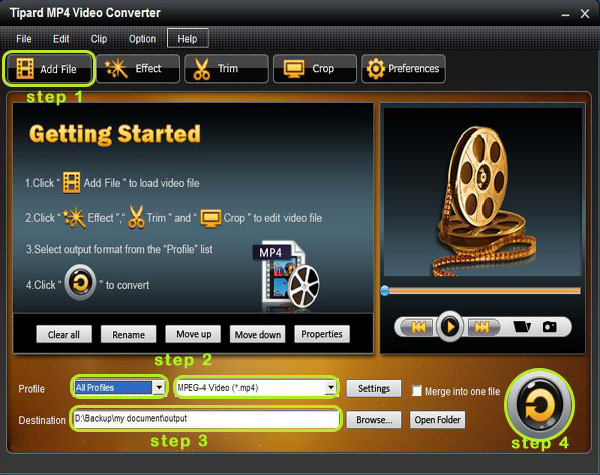
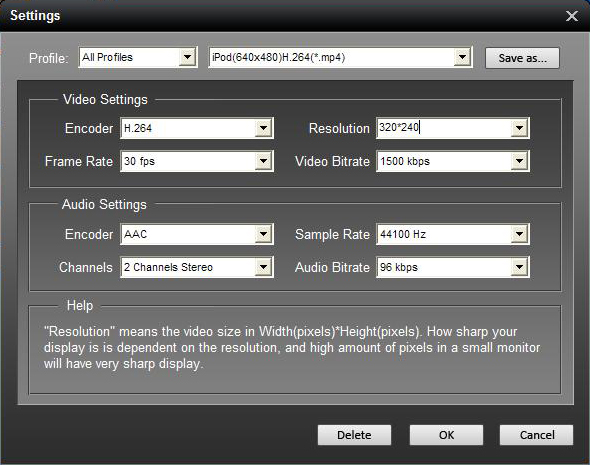
Step 2: Click " Add File" or "File Menu" to load video and audio files and select the file format by clicking "Profile" button. Moreover, you can set your own favorite setting by clicking "Setting" button next to the "Profile".
The setting interface is seen below:
Step 3: You can select your file path from Destination menu by clicking "Browse" button.
Step 4: Start the conversion by clicking the "Start "button.
OK. Only within a few minutes the conversion is completed.
Tips:
The Tipard MP4 Video Converter has the other functions besides converting the format. It can trim, crop, extract audio from video files and merge the separated video into one file.
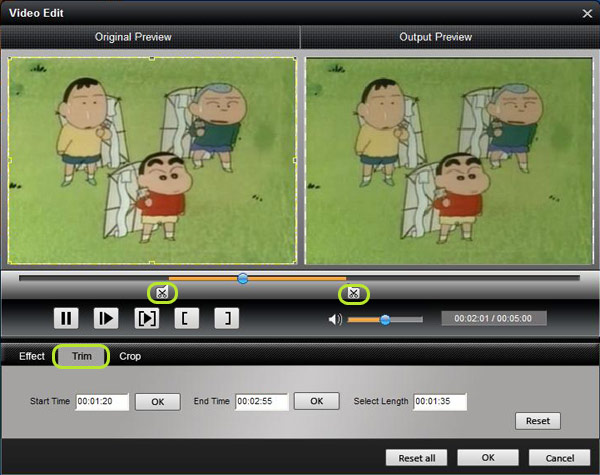
1. Trim
You can capture your favorite clips from your movie. Let’s begin. Click "Trim" to open the Trim window. Then enter the start time in the "Start Time" box and click OK; enter the end time in the "Set End Time" box and click OK.
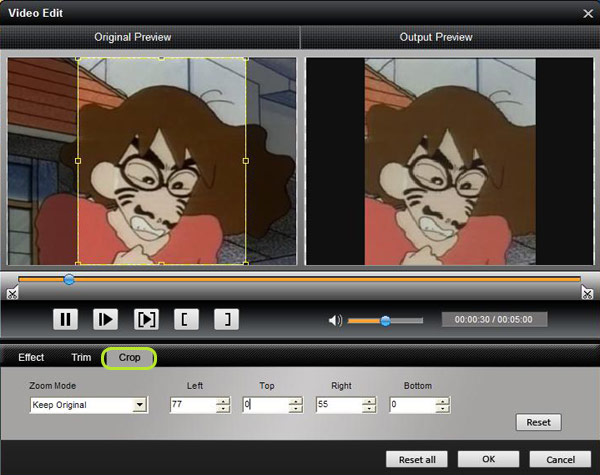
2. Crop
Also, you can remove the black edges around your movie video and customize the size of video play region as you wish. Click "Crop" to open the Trim window. Select a crop mode in the Crop Mode drop-down list and click OK to save the crop.

No comments:
Post a Comment